
TalkingParents: Co-Parent App
Monitored Communications, LLCParenting
2.31.83K Reviews
- Version
- 9.5.2
- Installs
- 100.00K
- Age Rating
- Everyone
Screenshots
Our Review of TalkingParents: Co-Parent App
 Analysis by Appyee
Co-parenting often turns ordinary details into a chain of messages, reminders, and crossed wires. TalkingParents: Co-Parent App is built to bring those conversations and practical arrangements into one place. I see its strongest use as a shared record for parents who need to coordinate regularly, not as a way to fix a difficult relationship by itself. That distinction matters: the app can help keep information organized, but the people using it still have to agree on what their child needs.
A practical routine for everyday coordination
A useful starting point is to treat the app as the place for child-related logistics rather than another general-purpose chat channel. Put a schedule question in the conversation, record an agreed change in the calendar, and keep relevant paperwork where it can be found later. When each kind of information has a predictable home, it is easier to check what was decided without searching through unrelated texts.
For example, if a school event changes a usual pickup, one parent can raise the change in a message and the parents can use the calendar to keep the practical plan visible. The value is not simply that the information is on a phone; it is that a message about the discussion and a calendar entry about the resulting arrangement serve different purposes. I would still read the details carefully and make sure both parents understand the same plan.
This is especially useful when schedules are busy or the parents live separately and need to coordinate handoffs, activities, and appointments. It can also reduce the temptation to rely on memory when a decision was made days earlier. I would not assume that putting something in a shared calendar automatically settles a disagreement, though. A calendar helps track arrangements; it does not replace a clear conversation when the arrangement itself is disputed.
Small habits that make the record more useful
Experienced users can get more from a communication record by keeping messages focused. I would put one main subject in each note, include the relevant date or event in plain language, and avoid mixing a pickup question with a separate disagreement. That makes later searches and rereading less confusing, especially when a conversation stretches over time.
It also helps to reply with the decision rather than only reacting to the message. If a proposal changes, state the updated time or plan clearly so the final exchange is understandable on its own. A calm, specific message is more useful than a long thread full of assumptions, even when the app preserves the exchange. The record can show what was written, but it cannot make an unclear message clear after the fact.
For documents, I would use descriptive names and keep the shared material limited to what is relevant to co-parenting. Before a meeting, check that the needed file is available rather than waiting until you are at the door. The app’s document storage can make an important report easier to retrieve, but it is still sensible to keep your own copy of essential records rather than treating a phone app as the only place they exist.
Where it fits among the alternatives
Compared with ordinary texting, TalkingParents is more purpose-built for keeping parenting conversations and practical details together. Text messages may be easier when both parents already communicate well and need only occasional coordination. A shared family calendar can be enough for parents who simply need to see dates, while a general cloud folder may suit people who only need to exchange files. Those simpler options can feel lighter, but they scatter communication, schedules, and documents across separate places.
The trade-off is that both parents need to be willing to use the same system. If one parent keeps sending important changes through text or another channel, the shared record can become incomplete and checking multiple places brings back the very confusion the app is meant to reduce. I would agree on a basic habit together: use the app for routine child-related coordination, and make sure urgent matters are handled through a channel that both parents will notice in time.
Who benefits most—and who may prefer something else
I would recommend considering it when communication needs structure, when there are recurring schedule changes, or when keeping a consistent record is important to both parents. It may also suit a parent who often needs to retrieve school or medical documents while away from home. The best results come when both people are prepared to keep messages factual and check the same calendar rather than treating the app as a one-sided filing cabinet.
It is less compelling for parents who already coordinate smoothly through a simple calendar and have no need for a dedicated communication record. It is also not a substitute for legal advice, mediation, or emergency communication. If the other parent will not use the app, or if the relationship is so tense that every message becomes a new argument, the software cannot create cooperation. In those circumstances, a simpler arrangement or support from an appropriate professional may be more useful than adding another digital channel.
The Basics of TalkingParents
Let's dive into what makes TalkingParents: Co-Parent App tick. First off, it's available on both Android and iOS, so you're covered no matter which side of the smartphone fence you sit on. The app is designed to facilitate communication, document sharing, and scheduling, all while maintaining a secure, third-party record. This can be particularly handy if you ever need to present documented interactions in a legal setting.
Intuitive Communication
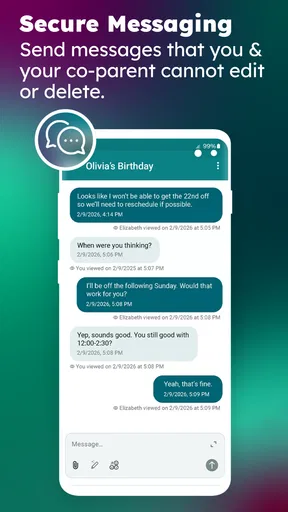
The messaging feature is super intuitive. Imagine texting but with the added bonus of a permanent, uneditable record. It's like having a digital notary at your fingertips. This feature is a game-changer for anyone who's ever found themselves in a "he said, she said" situation. All messages are time-stamped and cannot be altered, so there's no room for ambiguity.
Shared Calendar for Seamless Coordination
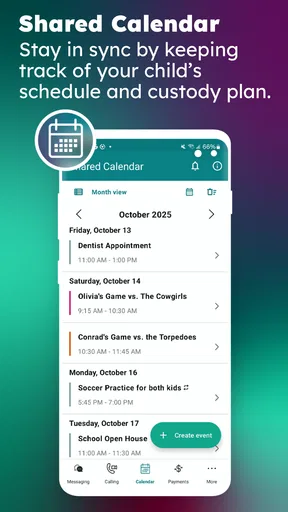
The shared calendar is another standout feature. It's like having a family planner in your pocket, minus the inevitable coffee stains. You can coordinate pick-up and drop-off times, extracurricular activities, and special events. Both parents can add, edit, and view calendar events, which means fewer scheduling mishaps and more time for you to enjoy a hot cup of coffee.
Document Vault
Do you ever feel buried under a mountain of paperwork? The app's document vault allows you to store and share important documents like medical records, school reports, and court orders. It's a bit like having a filing cabinet on your phone, minus the paper cuts. The vault is secure and easy to access, ensuring you're always prepared, whether for a doctor's visit or a meeting with your lawyer.
Security and Privacy
Let's talk security because, let's face it, nobody wants their private conversations exposed. The app is all about keeping your data safe. All communications are encrypted and stored securely, ensuring your privacy is never compromised. It's like having a digital bodyguard watching over your conversations.
My Experience
Now, let's get personal. Using TalkingParents: Co-Parent App was surprisingly straightforward. I was initially skeptical, as adding another app to my already cluttered phone felt overwhelming. But after a few days of use, it became clear that this app was more of a solution than a burden.
The messaging feature saved me from countless misunderstandings. Knowing that every message was recorded, I felt more at ease during our communications. The calendar reduced the usual back-and-forth texts about scheduling, which was a win for my sanity.
The document vault was a lifesaver during an unexpected school meeting. I was able to access and share my child's school report without rummaging through piles of paper at home. It's those little conveniences that keep me coming back.
Final Thoughts
Now that I have used it as part of a repeatable routine, my verdict is more qualified than a simple recommendation to download it. TalkingParents is a parenting app from Monitored Communications, LLC, and the free app is rated for Everyone. Its average rating is 2.6 from around 3,500 ratings, alongside about 1,800 written reviews and over 100,000 installs. That mixed reception is a useful reminder to weigh the app’s practical fit against your own needs rather than expecting it to work equally well for every family.
The app is free to install, with in-app purchases ranging from $12 to $249.99 per item. I would check the available options and their costs before relying on a paid capability as part of a routine. It first appeared on June 3, 2016, and version 9.0.3 requires iOS 11 or later. Those details matter if you are setting it up on an older device or deciding whether both parents can access it comfortably.
Settings and decisions to check before settling in
Before moving important communication into a new app, I would check the current settings and make sure notifications suit the way each parent handles messages. A notification that is easy to miss can undermine a shared routine; constant alerts can make an already tense exchange feel intrusive. The right balance depends on how often you need to respond, so I would test a normal week rather than assume the default behavior is ideal.
It is also worth agreeing on what belongs in the app. Routine schedule changes, child-related questions, and files both parents may need are natural candidates. A private note to yourself or a conversation that requires immediate attention may call for a different approach. Setting that boundary together reduces confusion about whether a message has been formally shared or is simply part of an informal exchange.
Because the app is intended to preserve communication, think before sending sensitive details or a message written in the heat of the moment. Even where a record is useful, permanence changes how I would write: short, factual, and centered on the child is usually safer than venting. I would also keep a separate copy of critical documents and confirm that a file opens before depending on it at an appointment.
A repeatable handoff workflow beats constant checking
A small weekly routine can make the calendar more useful without turning the app into a constant task. I would review upcoming handoffs and activities at a set point in the week, raise any conflicts early, and then check the calendar after the plan is settled. This creates a clear distinction between a proposal and an agreed arrangement, which helps prevent a tentative message from being mistaken for a confirmed change.
For a realistic example, imagine a child has a school activity on a day that normally belongs to one parent, while the other parent is responsible for pickup. One person can ask about the timing in the message thread; once they agree, the calendar can carry the final event details. If a document such as a school report is relevant, it can be stored separately instead of buried in the scheduling conversation. Each tool then has one job, making the record easier to scan later.
I would avoid checking the app repeatedly for reassurance. A regular review plus alerts that match the urgency of your arrangement is often a calmer pattern than treating every notification as a crisis. For time-sensitive changes, parents should agree on how to reach each other quickly; a preserved message is not automatically an emergency channel.
What a record can—and cannot—do
The app’s court-oriented record may be valuable when parents need an organized history, but I would not treat it as a guarantee that a court will accept or interpret material in a particular way. If documentation may matter in a legal dispute, ask a qualified legal professional how to preserve and present it. The practical benefit is that conversations and coordination have a dedicated place; the legal meaning of any record is a separate question.
There is a similar limit to the calendar and document storage. They can make shared information easier to find, but they cannot ensure that both parents read it, agree with it, or act on it. If a parent does not participate consistently, the app’s usefulness drops, and duplicate communication becomes a real burden. Before investing time in setting up a full routine, I would discuss the expected channel and response habits so both sides know what to check.
For parents who are choosing between this and everyday texting, the deciding factor is usually not the number of features but the need for a shared, organized record. If messages are friendly and rare, ordinary texts and a basic calendar may be less work. If schedules, documents, and written coordination routinely overlap, the dedicated structure can justify learning another app. I would choose the lightest system both parents will actually use.
My final recommendation
The strongest case for TalkingParents is not that it makes co-parenting effortless; it is that it can make recurring communication more orderly when both parents commit to using it thoughtfully. I would try it if you need a shared place for messages, scheduling, and documents, and I would establish a few simple habits before relying on it: keep messages specific, record settled plans in the calendar, and review upcoming logistics on a regular schedule.
If your current arrangement already works, or if one parent will not use a common channel, I would not add complexity just for the sake of having a dedicated app. The rating suggests experiences are mixed, so it is sensible to assess whether the workflow suits your family and to check the purchase choices before deciding what you need. For the right co-parents, it can be a useful organizer; for everyone else, a shared calendar and clear communication may be enough.
Verdict
Strengths of TalkingParents: Co-Parent App
- Easy-to-use interface for all users.
- Secure messaging with time-stamped records.
- Shared calendar for scheduling events.
- PDF records for legal documentation.
- Mobile and desktop accessibility.
Limitations of TalkingParents: Co-Parent App
- Some features require a paid subscription.
- Limited free features can be restrictive.
- Notifications can be overwhelming at times.
- Occasional syncing issues reported.
- User interface can feel outdated.
Similar Picks in This Category
View All
Family Space
Motorola Mobility LLC.3.9

شرطة الأطفال - مكالمة وهمية
Oub Apps4.1

Findmykids: Parental Control
LETEM LTD4.6

Pregnancy + | Tracker App
Philips Electronics UK Limited4.8

Policía de niños - para padres
Kids police4.7

Pregnancy App
Amila4.9
Frequently Asked Questions
What is TalkingParents and who is it for?
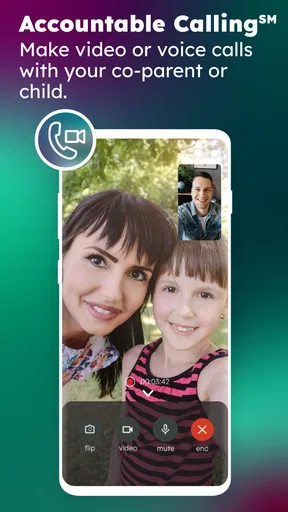
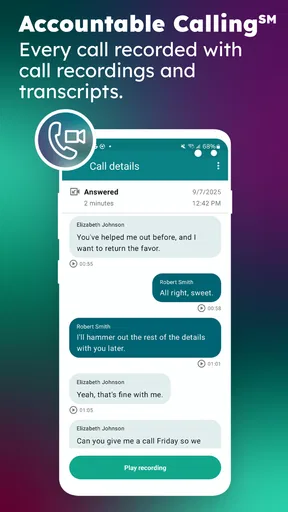
TalkingParents is a communication app designed for co-parents who need a structured and secure way to communicate about their children. It is ideal for parents who are separated or divorced, providing tools like messaging, call recording, and event planning to ensure clear and documented communication.
How does TalkingParents ensure privacy and security?
TalkingParents uses secure encryption to protect all communications and personal data. The app is designed to keep records of conversations that cannot be altered, providing a reliable source of documentation that can be used in legal situations if necessary. This ensures both privacy and accountability.
What features does TalkingParents offer to enhance co-parenting?
TalkingParents offers features like secure messaging, recorded phone calls, a shared calendar for scheduling, and downloadable reports of all communication. These tools are designed to help co-parents manage their interactions effectively and keep track of important information regarding their children's wellbeing.
Is TalkingParents available for both Android and iOS devices?
Yes, TalkingParents is available for download on both Android and iOS platforms. Users can access the app from the Google Play Store for Android devices and the Apple App Store for iOS devices, ensuring compatibility across different smartphones and tablets.
Are there any costs associated with using TalkingParents?
TalkingParents offers both free and premium versions. The free version includes basic features like messaging and call recording. However, for advanced features such as unlimited access to records and additional storage, users may need to subscribe to the premium version, which involves a monthly fee.
